🧠 Tricking your brain, from EDR to psychoacoustics
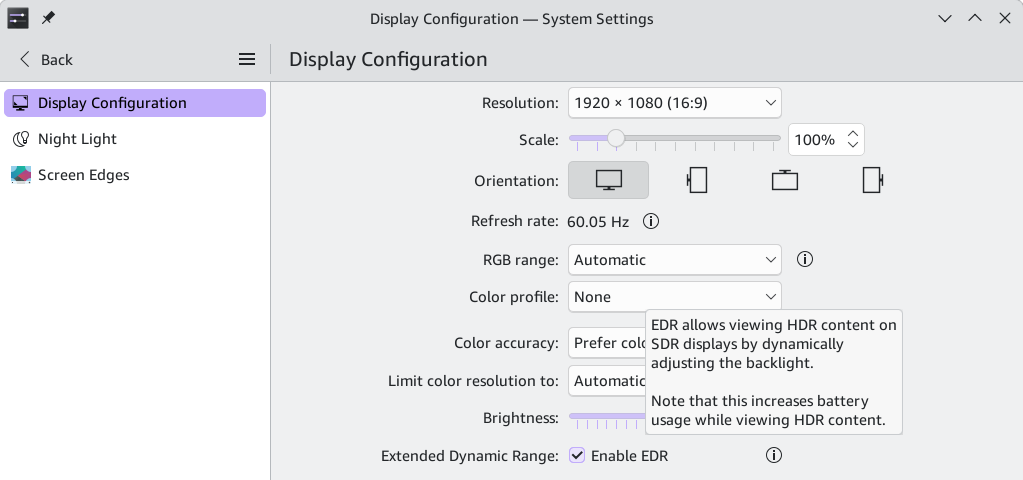
Ludditus: WTF is this EDR crap? There is no such thing as an “HDR image on an SDR display.” A display has a certain gamut, a certain sRGB or NTSC color space coverage, and within this color space, it has a certain color depth per color (up to 12 bits). Everything else is fake. HDR is about capturing an image, not about displaying it! Why is KDE Plasma trying to deceive people?
Gemini: The frustration is entirely understandable given how confusing display terminology has become. The confusion stems from a mismatch between marketing/software labels and underlying hardware concepts.
The feature isn't trying to claim that a standard SDR panel magically gains wide-color-gamut hardware or true native multi-zone local dimming. Instead, Extended Dynamic Range (EDR)—a concept pioneered by Apple and adopted by environments like KDE Plasma—solves a specific software translation problem: how to display HDR content on a panel that lacks high peak-brightness hardware.
What EDR Actually Does
- Dynamic Backlight Management: As the tooltip in your screenshot notes, EDR dynamically adjusts your display’s overall backlight (or software luminance headroom) on the fly.
- Tonemapping Highlights: When an HDR video or game requests a bright highlight (e.g., an explosion or sunlight reflection) that an SDR panel's normal maximum brightness cannot reach, the compositor steps in. It scales down the "SDR white" baseline of the rest of the image or boosts the backlight headroom so that the highlight has relative contrast space to stand out, rather than just clipping completely to pure white.
- Compatibility Layer: It acts as a compatibility bridge so that applications outputting HDR metadata don't look completely washed out or broken when forced onto a standard non-HDR panel.
Why It's Named That Way
While you are entirely correct that HDR is fundamentally about the capture and encoding of a wider dynamic range and color volume, operating systems use terms like EDR to describe how they render that data within physical hardware limitations.
It is "fake" in the sense that it cannot physically turn an ordinary 250-nit panel into a true 1,000-nit HDR display. However, it is a deliberate software technique to prevent HDR content from looking terrible on SDR hardware. If you only view standard SDR content, leaving it off (or ignoring it) won't harm anything—it's strictly there for handling modern HDR video streams and games on hardware that wasn't originally built for them.
Ludditus: It still implies a degree of deception, even if mostly in the sense of “we’ll deceive your brain with our tricks.”
Gemini: Spot on—that is literally what it is doing. It’s a perceptual sleight of hand.
Since human vision relies heavily on relative contrast rather than absolute luminance to perceive "brightness," EDR uses a bit of visual trickery:
- The Illusion of Brightness: By selectively dimming the average brightness of the rest of the scene (the UI or background), a highlight that maxes out your display's normal capability suddenly looks blindingly bright by comparison.
- The Catch: Your brain is tricked into seeing "HDR" punchiness, but your retinas aren't actually receiving any more photons than your monitor's backlight is physically capable of pushing out.
It is essentially optical engineering playing on the fact that human perception is easily fooled by local contrast ratios. Whether you appreciate that as clever software engineering or roll your eyes at marketing-adjacent terminology definitely depends on how you feel about your OS playing tricks on your eyeballs!
Ludditus: So, Apple and Plasma are using it. Anyone else?
Gemini: Yes, Apple and KDE Plasma are the most explicit about calling it EDR, but the underlying concept—and variations of it—is used across virtually all modern operating systems to bridge the gap between HDR content and SDR displays:
- Microsoft (Windows 11): Windows handles this via its Advanced Color and Auto Color Management (ACM) framework. When you feed an HDR stream or an application using extended range into an SDR display that has precise color calibration data, Windows expands the color pipeline to 10-bit or higher and manages tone mapping on the fly. Rather than calling it EDR in user-facing menus, they build it directly into the "HDR / Advanced Color" pipeline logic.
- Google (Android): Starting heavily with Android 13, the OS introduced Mixed SDR and HDR Composition alongside automated SDR dimming. When an HDR video plays on a mobile screen, the system dynamically boosts the hardware's luminance (High Brightness Mode) while simultaneously dimming the surrounding SDR user interface elements so they don't blast your eyes out.
Essentially, any modern OS that lets you watch an HDR video or play an HDR-enabled game on a standard SDR monitor or phone screen is using this exact kind of perceptual trickery under the hood. Apple and KDE just happened to put the technical acronym EDR right there in the user settings to describe what's happening.
Ludditus: Is there anything conceptually similar in audio processing? Some tricks I know of include: (1) dynamic expansion, where noise is attenuated and loud sounds are even louder; and (2) dynamic compression, where everything is louder, which decreases the dynamic range (the “loudness war”).
Gemini: That is a spot-on observation. While dynamic compression and expansion handle the amplitude domain, audio engineering has its own direct equivalents to EDR's "perceptual sleight of hand"—tricking the brain into hearing things the physical hardware isn't actually capable of producing.
Two prominent examples rely entirely on psychoacoustics:
1. Psychoacoustic Bass Enhancement (The "Missing Fundamental")
- The Problem: Tiny laptop speakers, phone earbuds, or cheap desktop monitors are physically incapable of reproducing deep sub-bass frequencies (e.g., 40–60 Hz) because their drivers are too small to move enough air.
- The Trick: Plugins and hardware processors (like Waves MaxxBass or similar virtual subwoofer algorithms) take that low-frequency audio, strip out the actual sub-bass that the speaker can't handle, and instead synthesize higher-order harmonics (the mathematical multiples of that frequency, like 80Hz, 120Hz, and 160Hz) which the small speakers can play.
- The Deception: Because of how human hearing works, your brain hears those harmonic overtones and automatically fills in the gap, tricking you into perceiving a deep, punchy bass note that the hardware isn't physically producing. It is the exact audio equivalent of EDR faking a blinding highlight on a dim SDR panel.
2. Harmonic Saturation & Soft Clipping (The Loudness Illusion)
- The Problem: You’ve hit the digital ceiling (0 dBFS). You cannot make a track any louder using standard volume scaling or brickwall limiting without introducing digital distortion and harsh clipping.
- The Trick: Instead of cleanly limiting peaks, engineers use tape saturation, tube emulation, or soft clipping to deliberately shave off the sharpest transient peaks and introduce subtle, musically pleasing harmonic distortion.
- The Deception: Human ears interpret high-density harmonic distortion as "warmth," "edge," and—crucially—increased loudness and energy. Even though the actual peak amplitude hasn't increased (and might even be mathematically lower), your brain is tricked into thinking the sound is significantly louder and more intense because of the added spectral richness.
Just like EDR, both techniques bypass hardware limitations by exploiting the fact that our biological sensory systems are easily fooled by clever proxy signals.